Imagine a DJ set, and instead of turntables or cd players or iPods, it has two recorders. Real-time-beat-slicing recorders. Sound from your microphone is analysed, and sliced into coherent fragments which are engaged in playback rightaway. Slice//Jockey is a crossover of music game and live performance tool.

Slice//Jockey is one fruit of [slicerec~] and [sliceplay~], Pure Data externals designed for real-time beat slicing. The technique inside is discussed on earlier pages. Slice//Jockey runs on Linux, MacOS and Windows, provided you have Pure Data plus a few external libraries installed. Links for download and installation are in the menu. Earlier versions of Slice//Jockey were targeted at Pd-extended. Eight years after the first release in 2011, renewed interest in the project resulted in Slice//Jockey version 3, now for vanilla Pd. This webpage is updated accordingly, also to reflect shifts in the realm of hardware and operating systems. The original page is archived here.
Slice//Jockey has detailed help files built into the project itself. Clicking the question mark on the front opens an overview with a miniature Slice//Jockey where you can click around further to open help windows on all buttons.

In particular the quickstart window will help to get your first sounds into the recorders. Despite its puzzling ascii labels, Slice//Jockey operation is pretty intuitive. Global lay out and concept of Slice//Jockey are described here on this page.
Two recorders are represented by blocks on the left and right side of the window. Sound from the computer's soundcard channels is mixed to mono and sent to both recorders. An input button [>] on each recorder controls whether that recorder is listening to your input audio or not. If it is listening, sounds with clear attack will be recorded slice-wise automatically. Indicators above the scope trace will tell you when recording happens.

Up to 8 slices are stored in a circular buffer for each recorder. When the 9th slice is recorded, the first one is discarded, and so on, following the FIFO (first in, first out) principle.
Technically speaking, your computer could easily record thousands of slices into memory. Restriction to eight slices per recorder is a conceptual choice, not an issue of memory efficiency. All eight slices are engaged in playback. No time for book keeping during live performance! If you want variation, just play again into the recorders. Do not be afraid of overwriting a beautiful sound with a dreadful squeak. That's life. The more you play, the better sounds you will find.
Input sound for the recorders is subject to basic processing only. You can activate a hi-pass filter, in case your microphone produces too much low frequency content due to proximity effect. Further, you can enable a compressor / noise suppressor to make the recorders more selective to your sounds in a noisy live situation. The mono input signal is plotted as a scope trace.

Filter, compander and in-to-out buttons are found on the bottom-left of the window, together with a time-signature (4/4 or 6/8) button. Notice those tiny characters 'ZXCV'. They indicate shortcut keys for the buttons. Shortcut keys only work when focus is on the Slice//Jockey window, and only for lower case characters (they are printed as capitals because that is how they show on keyboard keys).
It is beneficial to use a unidirectional microphone when feeding sound into Slice//Jockey. Omnidirectional microphones like the ones built into computers will pick up much of the speaker output and feed it back into the recorder. The recorder will happily continue slicing under such conditions, and results can be quite interesting. But it is better to have control over it. You can always point a unidirectional mic to the speaker deliberately if you want chaos. The picture below shows DIY unidirectional mics that connect directly to computer mic input jack.
 Hints for running Pd as a realtime process on Linux are on
puredata.info.
Real time priority for Pd reduces the risk of audio dropouts.
Hints for running Pd as a realtime process on Linux are on
puredata.info.
Real time priority for Pd reduces the risk of audio dropouts.
The x-y field has twenty control objects in two dimensions. This means, some 40 parameters are controlled on the surface which is printed below with it's actual size. Resolution and precision is much better than for 40 knobs or faders with each 1/40 of the field surface. Not surprisingly, the x-y layout is inspired by Korg's famous Kaoss Pad, but also by computer music applications like Jeremy Wentworth's GrainMainFrame.

With all buttons and x-y objects at the size of a fingertip Slice//Jockey is most conveniently operated from a touch screen, good old mouse being a less hands-on alternative. More about touch screens in the section about hardware further down.
Slice//Jockey records slices of audio into a circular buffer, while storing cuepoints for start and end of each slice. As stated, slices are engaged in playback immediately. But how is playback controlled? Obviously, you can not make a composition or midi sequence on beforehand for sounds still to be recorded. Instead, playback is triggered according to very basic principles, and manipulated with some controls.
Each recorder has three players associated: one for quarter notes, one for eighth notes and one for sixteenth notes. If you want, the players can be disconnected from BPM-synched triggering, to play with random time intervals. Each player follows a pattern to select slices for playback. These patterns are generated by a mathematical routine which guarantee optimal variation within a cycle of sixteen triggers. If you move playback controls, conditions for these routines change, and different patterns will result. For sixteenth notes, the pattern cycle is one bar. For eighth notes the pattern encompasses two bars, and for quarter notes four bars. If you want, the players can be disconnected from pattern-wise triggering, to play randomly selected slices.
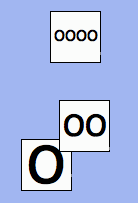
These are playback controls on the x-y field, for quarter notes, eight notes and sixteenth notes. In horizontal direction, slice playback speed is set. Playback speed determines pitch, like a record or tape which is slowed down or sped up. Slice playback speed/pitch is independent from BPM tempo or trigger tempo.
In vertical direction, the controls set variation in playback speed, as an addition to the basic playback speed which was set in horizontal direction. Variation of playback speed does not mean vibrato. From start till end of one slice, playback speed will remain constant. Playback speed will only vary from one slice to the next.
Each of both recorder-playback sections has it's own effects controls on the x-y field. There is feedback delay, resonant filter, distortion and reverb.
Left and right sections each have their own colour, which is reflected in controls on the x-y field. Here we see white-coloured controls, belonging to the left section.
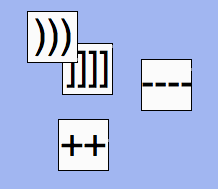
Global controls on the x-y field are colored black. They control:

The right bottom of the window has buttons for help, settings, and session recorder. A simple soundfile player is included for quick evaluation. Below them is a beat indicator, counting beats according to the BPM value on the x-y field. Notice that the beat indicator will always sync with your live session, and not with soundfiles played back.
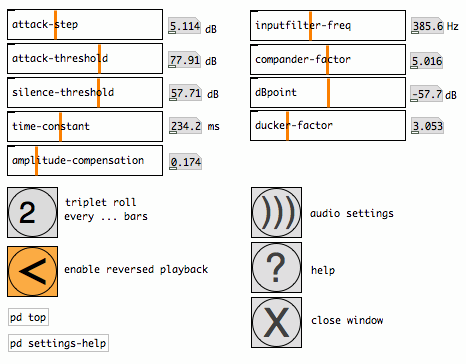
Clicking the exclamation mark on the front window pops a window with technical settings. When preparing for a Slice//Jockey session, it may be necessary to tune some of these settings. This window has it's own help file to guide you through options.
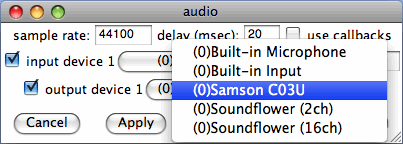
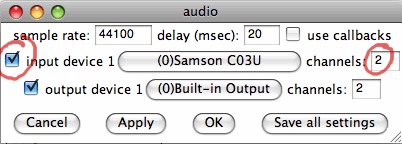
Here I want to highlight Pure Data's audio settings, where you can select input and output devices for the program. Slice//Jockey listens to the input device which is set here. Do not forget to check the checkbox for input device, and set the appropriate number of channels. After selecting your devices, click 'apply' and 'ok'. Below is Pd's audio properties window for MacOSX. The window looks different for other operating systems.
Another setting to be highlighted is 'silence-threshold'. It's value determines at what sound level slice recording will end if there is nothing useful to hear anymore. But, imagine you have a very noisy microphone preamp, like is the case with some built-in mics: recording will not stop, even when you are 'silent', and the buffer is filled mainly with noise. You may even think that Slice//Jockey does not work at all. So, set the silence-threshold at least above the noise floor. You may need to tune mic level in your computer's system settings.

Slice//Jockey3 runs on Linux, MacOS and Windows with various hardware architectures (Intel 32/64 bit, ARM). In terms of CPU load an old skool netbook with Atom processor used to represent the minimum hardware requirement for Slice//Jockey. Raspberry Pi 3 and 4 are comfortable with the demands of Slice//Jockey3 and leave enough CPU cycles to run other stuff simultaneously. More powerful hardware like a recent laptop hardly notices the load. The main window is tailored to fit a netbook display at least (1024*600).
Slice//Jockey was conceived in 2010 with touch screen in mind, anticipating the expected proliferation of touch-enabled computers. In retrospect this was over-optimistic. In 2019 laptops with touch screen are available but still a minority. In the meantime an interesting breed of touch computers has become affordable on the second hand market: Panasonic Toughbooks. Laptop/tablet convertible CF-19 is my favorite, with resistive touch screen that works under Linux too.

General purpose computers with touch screen remain on the fringe, and Slice//Jockey with them. People have sometimes asked "When comes Slice Jockey for iPad?" This is unlikely to happen. The fun of Pd is that a user can open a patch for inspection and modification. You can learn from the Pd code inside, tune it to your own needs, or help with development. Things that can't be done on an iPad.
The first Slice//Jockey version provided an interface for game controller as alternative for touch. This proved hard to maintain and was discontinued in later versions.
The Slice//Jockey package in the download below contains Pure Data patches plus source code and binaries for Linux Intel + ARM, MacOS and Windows. It was tested to work with vanilla Pd 0.49 and 0.50, and may work with earlier vanilla versions in some cases. Previous Slice//Jockey versions (for Pd-Extended) are archived with the original web page.
 SliceJockey-3.0.0.zip 1.8 MB
To start with, SliceJockey3 needs vanilla Pd installed on your computer. On Linux this is often available through the package manager. For MacOS and Windows builds visit the page of Pd author Miller Puckette:
With vanilla Pd installed it is easy to get three external libraries needed by SliceJockey3: hcs, zexy and nilwind. Navigate to the Help > Find Externals menu item and type a library name in the search window that pops up. It should be safe to just select the most recent of search results.

Foreign architectures (builds assumed incompatible with your computer) are hidden by default. At least Raspbian users should better change this in the window's preferences since Raspbian is classified as armv6 and compatible arm/armv7 builds are hidden otherwise.
Documentation about Pure Data can be found on puredata.info. Also consider visiting the Pure Data forum and pd-list archives. If you find a bug in Slice//Jockey patches or included externals, please send an email to the address in the readme file.